The comparison
Batmail vs Superhuman: your own rules, and a brief at the end of them
Superhuman sorts your mail into its own set of labels and makes you fast inside it. Batmail runs rules you wrote yourself, says why it did each thing, and ends the night with one morning brief.

The short answer
- Pick Superhuman if
- You want the fastest email client there is. That craft is real, and Batmail is not a client at all.
- Pick Batmail if
- You want to write the rules: Batmail takes any condition you can put in a sentence, rather than a set of labels the vendor defines.
Superhuman pricing and features verified against the sources listed at the foot of this page. Written by the Batmail team, who make one of the two products compared here.
The short version
Two different jobs
What each product is actually for, stated fairly.
What Superhuman is
Superhuman Mail is the email product of Superhuman, the company called Grammarly until October 2025, when it renamed itself after the email client it had bought that July. It comes two ways: the standalone client it is famous for, with split inboxes, a command palette and more than a hundred keyboard shortcuts; and Email Assistant, which brings the same AI into a Gmail or Outlook inbox you already use, with no new app. Its AI sorts mail into built-in labels (a fixed six inside Email Assistant, a different built-in set plus a label library in the Mail app), archives low-priority messages on its own, drafts replies in your voice, and resurfaces threads you never answered.
What Batmail is
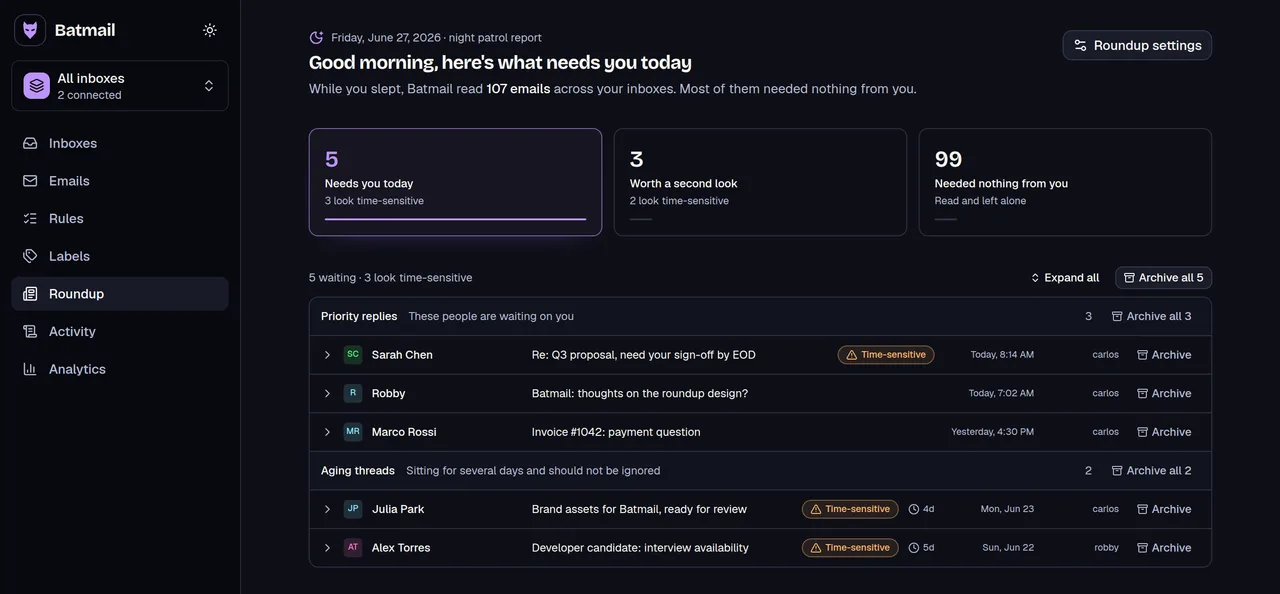
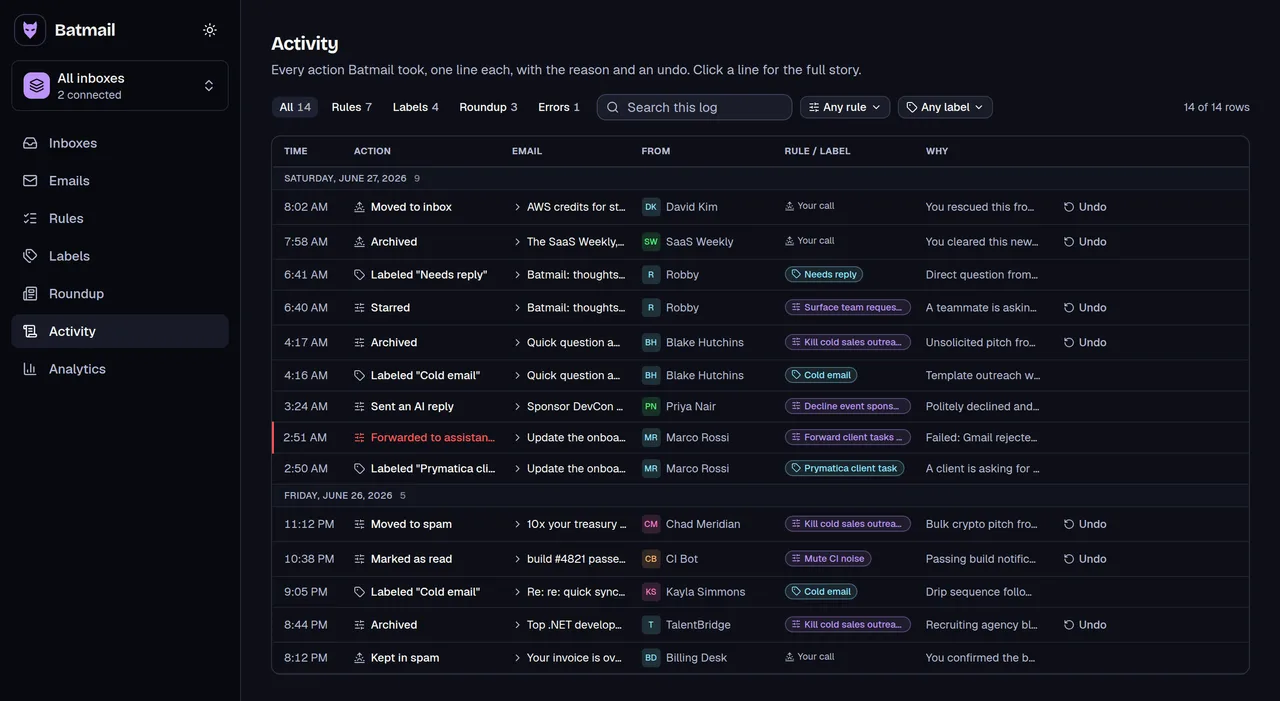
Batmail overlaps with the automation half of that, and differs in three ways worth knowing. Its rules are sentences you write rather than a vendor label set, so "looks like a cold sales email from someone I never asked" is a rule. Each overnight action carries a written reason, with one-click undo on the reversible ones, so you can audit the night rather than trust it. And the roundup is the product rather than something to assemble: one morning brief of what needs you, in the app or in your inbox, on every plan. Superhuman can produce a morning briefing too, but you build it from its AI agent and MCP skills. Batmail is not a client, and it never tries to be one.
Side by side
Batmail vs Superhuman, feature by feature
No column gets padded and none gets dimmed.
| Feature | Batmail | Superhuman |
|---|---|---|
| What it is | A service on top of Gmail | A client, or an agent in your inbox |
| Sorts your inbox | Your rules, any condition | Built-in auto labels, plus custom |
| Explains each decision | Written reason on each overnight action | A label, no reason |
| Undo what it did | One click on archive, star, spam, read | Move it back yourself |
| Replies for you | Sends one, only where a rule says so | Drafts one in your voice |
| Morning brief | Built in, in-app or emailed | Build one with its AI agent |
| Keyboard-speed client | No, you stay in Gmail | Yes, its reason for being |
| Email providers | Gmail only | Gmail and Outlook |
| Free plan | Yes, one inbox | Not for Mail |
| Priced by | $12 per inbox / month | $30+ per seat, inboxes unlimited |
Superhuman pricing vs Batmail pricing
Superhuman Mail: Starter $30 per user per month ($300 a year, about $25 a month); Business $40 per user per month ($396 a year, about $33 a month), which adds AI-prompt custom labels, Ask AI and CRM integrations; Enterprise on request. There is no free tier for Mail, though the wider Superhuman suite now sells a $0 tier that does not include it. One seat covers as many Gmail and Outlook accounts as you like, so for a single person running three or more inboxes Superhuman works out cheaper than $12 per inbox; below that Batmail is cheaper, and free on one. Superhuman prices checked 12 August 2026.
Proof
What the Batmail column actually looks like
The screens behind the claims, captured from the product.
The verdict
Which one should you pick?
Both answers, because only one of them applies to you.
Choose Superhuman if…
- You want the fastest email client there is. That craft is real, and Batmail is not a client at all.
- You run three or more inboxes yourself: one Superhuman seat covers unlimited accounts, which beats $12 per inbox at that point.
- Your mail is on Outlook. Batmail is Gmail-only today.
- You want native mobile apps, team features like shared conversations, or Salesforce and HubSpot integration. Superhuman has all three; Batmail has none of them.
Choose Batmail if…
- You want to write the rules: Batmail takes any condition you can put in a sentence, rather than a set of labels the vendor defines.
- You want a reason attached to each overnight decision, and one-click undo on the reversible ones, instead of finding mail already filed.
- You want the morning brief to be the product, not something you assemble: Superhuman can brief you, but you build it from its AI agent and MCP skills.
- You want to start free on one inbox, with labels and rules included rather than held back for a paid tier.
Questions
What people ask
The answers worth having before you pick either one.
Is Batmail a replacement for Superhuman?
Not for the client. Superhuman's speed, shortcuts and split inboxes live in their app, and Batmail has no app to replace it with. What Batmail replaces is the automation half: instead of a vendor label set deciding what your mail is, you write the rules yourself, and each overnight action comes with a written reason you can audit in the morning. If you love the client, keep it.
How much does Superhuman cost?
As of 12 August 2026, Superhuman Mail Starter is $30 per user per month, or $300 a year (about $25 a month). Business is $40 per user per month, or $396 a year (about $33 a month), and adds AI-prompt custom labels, Ask AI and CRM integrations. There is no free tier for Mail, though the wider Superhuman suite sells a $0 tier that does not include Mail. Batmail is free on one inbox and $12 per inbox per month.
Which is cheaper, Superhuman or Batmail?
Below three inboxes, Batmail; at three or more, Superhuman. Superhuman charges per person and one seat covers as many Gmail and Outlook accounts as you like, while Batmail charges $12 per inbox. So one inbox is free on Batmail against $30 a month, two inboxes are $24 against $30, and three inboxes are $36 against the same $30. If you run a lot of inboxes yourself, their pricing model wins.
Does Batmail have auto labels like Superhuman?
Both label automatically; the differences are who defines the labels and where they live. Superhuman ships a built-in set of auto labels on every plan, with AI-prompt-built custom ones on Business, and they appear in your mailbox. Batmail's echo labels are ones you define in your own words, on every plan including the free one, and each carries a written reason you can audit, but they live in Batmail rather than as Gmail labels. If you want a real Gmail label applied, that is a rule action instead.
Can I keep Gmail and still use Superhuman?
Yes, and this is worth knowing before you compare: Superhuman's Email Assistant brings its auto labels, auto archive, auto drafts and reminders into an existing Gmail or Outlook inbox with no new app. So "you have to switch clients" is no longer true of them. The remaining differences against Batmail are the ones above: who writes the rules, whether each action carries a reason, and whether you get a morning brief.
Try the night shift on one inbox
Scout is free on one inbox, no card required, and your first morning roundup lands tomorrow.
More comparisons
Weighing the others too?
The same treatment for the rest of the field.
How we compared, and what we read
Batmail is built and operated by Momentum Labs, and every source is listed below. Every Superhuman fact here was taken from their own published pages rather than from review sites, which in this category are frequently a year out of date. A second pass then checked each claim against the same primary sources. The Batmail column was checked against our own source code.
Superhuman facts on this page were taken from these pages on . Pricing in this category changes; if you find something out of date here, email support@batmail.ai and we will correct it.
Superhuman and its logo are trademarks of their respective owner. The name and the logo appear here to identify the product being compared, in its owner’s own unmodified artwork; this page is not endorsed by or affiliated with them, and Batmail is not their product.