Free tool, no signup
Free email recall checker
Say where you sent it from and who got it. See if it can still be recalled, the steps, and a follow-up to send.
Can it be recalled?
Recall should work
Recall it now: it should come back before it is opened.
- You and the recipients have Microsoft 365 work accounts in the same organization, which recall needs.
- It has not been opened, so the copy can be taken back.
- Classic Outlook cannot recall in Online mode or with several Exchange accounts in one profile, and a missing Recall command usually means the account is not an Exchange account or recall is switched off.
- Anything a recipient already forwarded by hand stays where it went.
How to recall it:
- 1In the folder pane, choose Sent Items.
- 2Double-click the email to open it in its own window. Recall is not offered in the reading pane.
- 3With the classic ribbon: on the Message tab, in the Move group, select More Move Actions, then Recall This Message. With the simplified ribbon: on the Message tab, select More commands, point to Actions and select Recall This Message.
- 4Choose Delete unread copies of this message, or Delete unread copies and replace with a new message, and select OK.
- 5Open the Message Recall Report that arrives in your inbox to see, recipient by recipient, whether it worked.
If it slips through anyway, send this:
Subject: Correction: [subject]

Hi [name],

One correction to my last email: [the right detail]. Everything else in it stands.

Sorry for the confusion.

[your name]
For next time: Next time, a rule can hold every email you send in the Outbox for up to 120 minutes: File, Manage Rules & Alerts, New Rule, Apply rule on messages I send, then defer delivery by a number of minutes.
This tool handles one email. Batmail handles the rest.
Continue with GoogleHow to use it
Here is how to check a recall in under a minute.
The answer changes with each choice, and the follow-up email is written for you whichever way it goes.
- Pick the app you sent the email from, and the kind of account that sent it.
- For a work account, say whether the people who got it are inside your organization and whether they have opened it.
- For Gmail, Mail on iPhone or a personal account, say whether you pressed Send seconds ago or longer.
- Follow the steps for your app straight away. Recall works best before anyone opens the email, and Undo lasts only seconds.
- Fill in the follow-up email and copy it, in case the recall fails or cannot be tried.
Who can take an email back
- Recall works
Microsoft 365, same organization, not opened
Recall works.
- It depends
Microsoft 365, same organization, opened
Only if your organization allows recalling read mail.
- It depends
Another organization on Microsoft 365
Only if its administrator allows recalls from yours.
- No recall
Outlook.com, Hotmail, Live or MSN
No recall. Undo for up to 30 seconds.
- No recall
Gmail
No recall. Undo for up to 30 seconds.
- No recall
Mail on iPhone or iPad
No recall. Undo for 10 seconds by default.
These three emails show what the checker says.
A price list sent inside the company can be recalled.
Kasimir Aldercott sends the spring price list to his sales team at Wrenfold Cycles from classic Outlook, with a trade price of $41 that should be $14. Everyone is in his organization and nobody has opened it, so the checker says "Recall it now: it should come back before it is opened." It gives 5 steps, from Sent Items to the Message Recall Report, and a correction to send if a copy slips through.
Proofs sent to another company cannot be recalled.
Ottilie Fenwright sends the wrong proofs to a client at another company from new Outlook. The checker says "Recall will not reach people outside your organization. Send a short follow-up instead." and writes the follow-up with the subject "Corrected attachment: Proofs for the spring catalogue", ready to go with the right file attached.
A Gmail email spotted two minutes later needs a follow-up.
Ottilie sends a half-written quote from Gmail and notices two minutes later, long after Undo has gone. The checker says "It cannot be pulled back now. Send a short follow-up instead." and writes "Re: Quote for the shop fit-out", asking the reader to wait for the full version. It also suggests a 30 second Undo Send period for next time.
Seconds to undo after Send
- Outlook for Mac120 s
Up to 120 seconds, if a send delay is set.
- Gmail30 s
5, 10, 20 or 30 seconds, chosen in Settings.
- Outlook.com30 s
Up to 30 seconds, if Undo send is turned on.
- New Outlook for Windows10 s
Up to 10 seconds, if Undo send is turned on.
- Mail on iPhone and iPad10 s
10 seconds by default, longer with Undo Send Delay.
These are the mistakes that make a recall fail.
The recall was tried from the reading pane.
Classic Outlook offers Recall This Message only when the email is open in its own window. Double-click it in Sent Items first.
The recall waited until after lunch.
Every minute gives the reader another chance to open the email, and Microsoft's help page says recall works on unopened mail. Recall it the moment you notice.
Recall was tried on a client's address.
Recall reaches people in your own organization, and another one only if its administrator allows it. For anyone outside, send the follow-up instead.
Nothing was sent after a failed recall.
When the Message Recall Report says it failed, the reader still has the email. A short, plain follow-up keeps the mistake small.
Two other free tools help you send it right the first time.
- The professional email rewriter checks the wording before you press Send.
- The email schedule planner holds an email back until the time it should land.
Questions
These are the questions people ask.
The answers worth having before, and after, you use the tool.
Can you recall an email in Outlook?
In one case. Microsoft's help page says you and the recipient both need a Microsoft 365 work or school account in the same organization, and the recipient must not have opened the email yet. An email sent from an Outlook.com, Hotmail, Live or MSN address cannot be recalled.
Does recall work after the email was read?
Microsoft's help page says no. Its documentation for administrators says an organization can choose whether read mail can be recalled, so a read email sometimes comes back. The Message Recall Report shows what happened for each person.
Will the recipient know I recalled an email?
Not with the settings Microsoft starts with. Its documentation says recipients are told about a recall only if an administrator turns that notice on. A copy someone already forwarded by hand stays where it went.
How long does an Outlook recall take?
Microsoft's help page says the Message Recall Report usually arrives in under 30 seconds, and that Outlook keeps trying for up to 24 hours when a mailbox cannot be reached.
Can I unsend an email in Gmail?
Only for a few seconds. Gmail shows Undo right after you send, for the cancellation period set in Settings: 5, 10, 20 or 30 seconds. After that, Gmail has no recall.
How do I recall an email in the Outlook app on a phone?
With a work account, open the email in your Sent folder, tap the three dots for More options, and tap Recall. Microsoft's help page for the app gives the same rule: Microsoft 365 on both ends, in the same organization.
Is anything I type sent anywhere?
No. The checker runs in your browser on rules taken from Microsoft's, Google's and Apple's own help pages, and nothing you type leaves this page.
This tool handles one email. Batmail handles the rest.
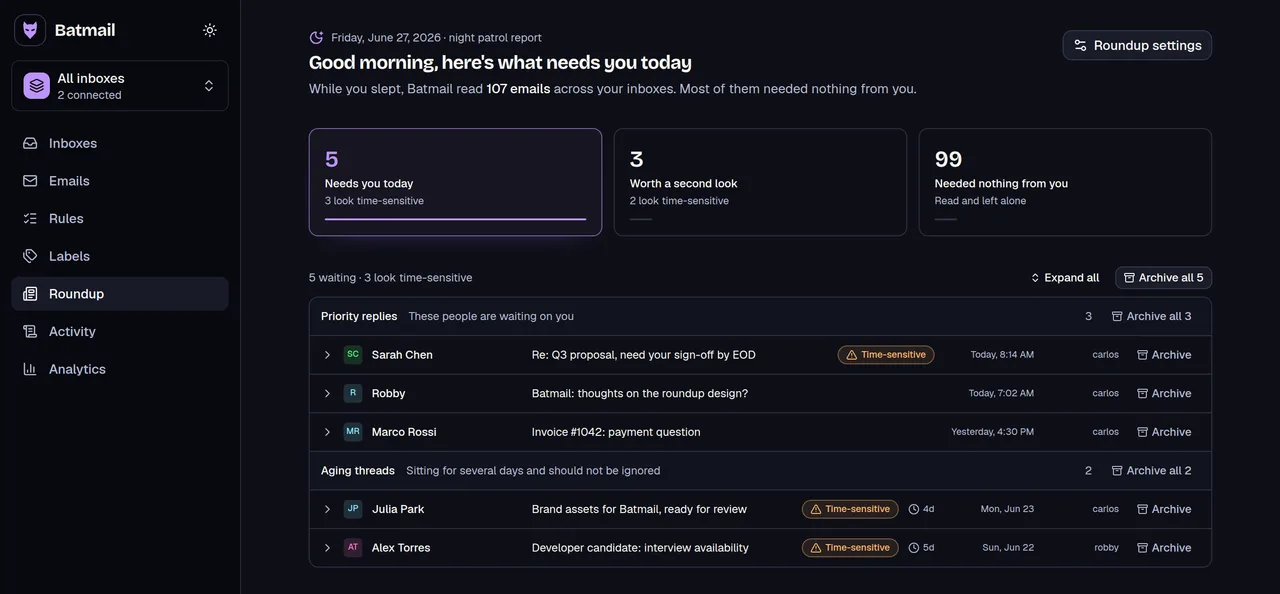
Recall fixes one email you sent. Batmail looks after the mail you receive in Gmail: every night it reads what landed, sorts it by what it needs from you, and puts the replies that matter at the top of one morning brief.
More free tools
There are more free tools here.
All free, all without an account.