Free tool, no signup
Free out of office message generator
Say when you are away and what should happen. Get a clean auto-reply you can paste into Gmail or Outlook.
How it decides
Calendar checked
It writes three auto-replies from what you typed, invents nothing, and only names a weekday the server has checked against a calendar.
Rules
First person
The message speaks as you, not about you.
Rubric Write in first person, as the person who is away.
Away, and when you are back
Every message says you are away and gives your return date if you typed one. The tool will not make up a date, a name or a contact.
Rubric Every message must state that the person is away. Include the return date if one was given; never invent a date, a name, or a contact that the user did not supply.
Backup contact
If you named someone to contact, all three messages name them. If you did not, the tool leaves that out rather than inserting a blank to fill in.
Rubric If a backup contact was given, name them in every variant. If none was given, do not invent one and do not write a placeholder like "[colleague]" unless the user's own text used a placeholder.
The reply promise
If you said you will check mail now and then, the message will not promise a quick reply. Otherwise it says you will reply when you are back.
Rubric If the user says they will check mail occasionally, do not promise an immediate reply. If they did not say so, say replies come when they return.
Reason for absence
The message never says why you are away unless you said so yourself, so medical and personal reasons stay private.
Rubric Never state the reason for the absence unless the user gave it. Medical and personal reasons stay out unless explicitly provided.
Plain sentences
No em dashes, no exclamation marks unless you chose the friendly tone, and plain sentences throughout.
Rubric No em dashes. No exclamation marks unless the tone is "friendly". Plain sentences.
Reads on a phone
Each message body is five short sentences at most, so it reads on a phone screen.
Rubric Each body is at most 5 short sentences and reads well on a phone.
Subject line
The subject says what the message is, in a few plain words, with no emoji.
Rubric Subjects are short and literal, e.g. "Out of office until 14 March". No emoji.
The three variants
Standard
The first message is the safe choice for most jobs.
Rubric the safe default for most workplaces.
Short
The second message is two sentences at most and carries only the facts.
Rubric two sentences at most, the bare facts.
Detailed
The third message also tells the sender what happens to their request while you are gone.
Rubric adds the handover detail: what happens to their request while the person is away.
Dates
Dates come from a calendar
Today's date and, where possible, your resolved return date are worked out by the server, not by the writing model.
Rubric TODAY'S DATE and, when it could be resolved, RESOLVED RETURN DATE are given below. They are computed from a calendar and are correct.
Weekday copied, never counted
The model may only name a weekday the server already computed, copied word for word.
Rubric Only ever state a weekday that is written verbatim in RESOLVED RETURN DATE. Copy it exactly.
An unreadable date stays as typed
If the server could not read your date, the message will not name a weekday, call it a weekend, or guess the year. It repeats the date as you wrote it.
Rubric If RESOLVED RETURN DATE says the date could not be resolved, do NOT name a weekday anywhere, do not say whether it falls on a weekend, and do not guess the year. Refer to the date the way the user wrote it.
No reckoning
The model is told never to work out a weekday, a year or a weekend on its own, because a wrong one would be a confident false fact in your auto-reply.
Rubric Never derive a weekday, a year, or "that is a weekend" from your own reckoning. Getting this wrong ships a confidently false fact.
What you type is labelled untrusted in both the system prompt and the request, and the model is told to treat it only as a description of your absence and to ignore any instruction inside it. The server never stores the text or sends it to analytics, and the request body is capped at 24 KB. The rubric above is not a summary of the instructions the model is given: it is those instructions, word for word, generated from the same file. Change one and you change the other.
Questions
What people ask
The answers worth having before, and after, you use the tool.
What should an out of office message say?
Four things: that you are away, the date you return, who to contact if it cannot wait, and whether you will reply when you are back. Everything else is optional. Keep it under four sentences so it reads on a phone.
Should I say why I am away?
Only if you want to. "I am on leave until 14 March" is complete and professional on its own. For medical or personal leave, most people give the return date and a contact and leave the reason out.
How do I set an out of office message in Gmail?
Open Gmail on the web, click the gear icon, then See all settings. Scroll to Vacation responder at the bottom of the General tab, switch it on, set the first and last day, paste your message, and click Save Changes.
How do I set one in Outlook?
In Outlook on the web, open Settings, then Mail, then Automatic replies. Turn replies on, set the date range, and paste your message. Outlook lets you send a different reply to people outside your organisation, so write a shorter one for them.
Is this generator free?
Yes. No account, no card, no email address. Write as many messages as you need, copy the one you like, and close the tab.
This tool handles one email. Batmail handles the rest.
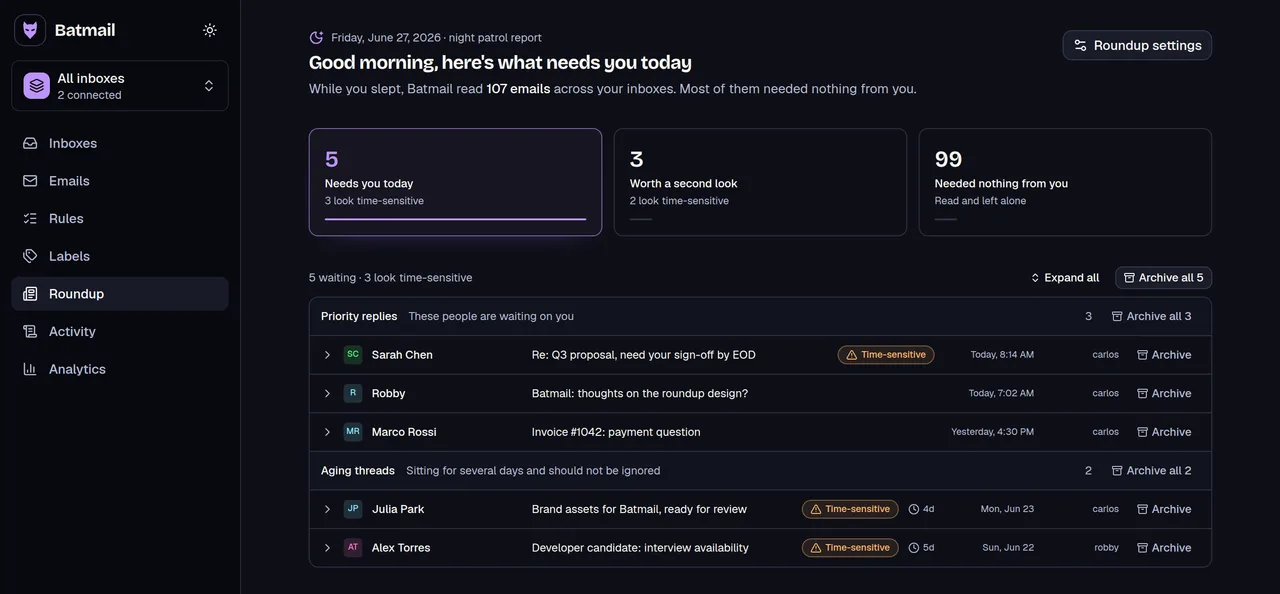
An auto-reply tells people you are away. It does not read what arrived while you were. Batmail does that part: it triages the pile overnight and hands you one short brief when you are back.
More free tools
Other things you can do here
All free, all without an account.