Free tool, no signup
Free meeting request email builder
Pick the purpose, the length and the tone, add names and times, and copy a ready meeting request email.
Your meeting request
Introduction and 30 minutes on [the topic]
Hi,

I'm [your name]. We have not met yet, and I would love to talk with you about [the topic]. Could we find time for a 30-minute video call?

Tell me a time that works and I will fit around you. I will send an invite with the link once we pick a time.

Thanks,
[your name]
This tool handles one email. Batmail handles the rest.
Continue with GoogleHow to use it
Here is how to build your email.
The email on the page changes as you choose, so you can try every option.
- Choose the purpose that fits: a first introduction, a catch-up, a project meeting, a request for advice or a client review.
- Choose how long the meeting should be and how the two of you will meet.
- Choose a tone. The formal ask reads "Would you be available for a 30-minute video call?" The friendly one reads "Could we find time for a 30-minute video call?" The direct one reads "Can we do a 30-minute video call?"
- Type both names, the topic and two or three times you can do.
- Copy the email, or open it in your mail app with the button under it.
The four parts, in order
- 01
Who and why
One sentence.
- 02
The ask
A set amount of time.
- 03
The times
Two or three, specific.
- 04
How you meet
A call or a place.
These three examples show the builder at work.
A first introduction uses the formal tone.
Sunniva Brackenlow wants 30 minutes with a buyer she has never met. She picks First introduction, 30 minutes, Video call and the formal tone, and types the topic as your packaging supplier review. The email opens with who she is, asks for the 30 minutes and offers two times.
A catch-up with a former teammate uses the friendly tone.
Kasimir Aldercott has not spoken to a former teammate since spring. He picks Catch-up, 15 minutes, Phone call and the friendly tone. The email is a few short sentences and ends with an easy way to suggest another time.
A client review uses the direct tone.
The team at Hallowmere Print Co meets one client every quarter. They pick Client review, 45 minutes, In person and the direct tone, and list three times. The email states the purpose and the options and stops.
One ask, three tones
Would you be available for a 30-minute video call?
Could we find time for a 30-minute video call?
Can we do a 30-minute video call?
These are the mistakes that slow down a yes.
The email asks whether they are free sometime.
An open question hands the scheduling to the reader. Offer specific times and let them pick one.
The length is missing.
People protect their calendars. A request for 15 minutes is easier to say yes to than a meeting of unknown length.
The time zone is missing.
A time with no zone is a guess for anyone in another city. Write the zone next to every option.
The reason comes last.
If the purpose sits in the third paragraph, the reader has to hunt for it. Put it in the first sentence.
Two other free tools help once the email is written.
- The professional email rewriter adjusts the wording if you edit the draft.
- The out of office message generator covers the days you cannot take meetings.
Questions
These are the questions people ask.
The answers worth having before, and after, you use the tool.
How do I ask for a meeting by email?
Say who you are and why you are writing in one sentence, ask for a set amount of time, offer two or three specific times, and say how the meeting will happen. The builder above writes those four parts in that order.
How many times should I offer?
Two or three. With one option, the other person has to do the scheduling if it does not suit them. A long list makes them read your whole calendar. Give the day, the date, the time and the time zone for each.
What should the subject line of a meeting request say?
The topic and the length, such as 30 minutes on the Q3 launch plan. The reader can decide from the inbox whether to open it, and can find it again later by searching for the topic.
How formal should the email be?
Match how you would speak to the person. Use the formal tone for someone senior you have not met, the friendly tone for a colleague or a contact you know, and the direct tone when the two of you already work together and only the details matter.
Does the builder use AI?
No. Every sentence comes from templates written by a person. Your choices pick the sentences, and your names, topic and times fill the gaps. Nothing you type leaves your browser.
This tool handles one email. Batmail handles the rest.
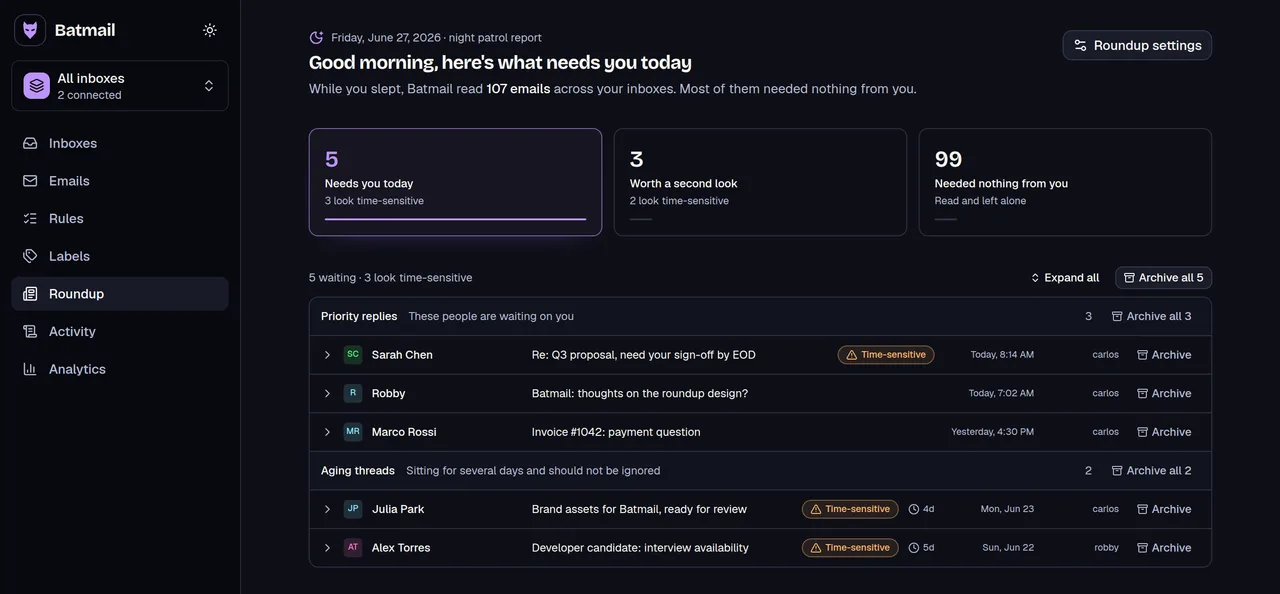
Asking for the meeting is one email. The replies that follow are many. Batmail reads what arrives overnight and puts the threads that need you at the top of one morning brief.
More free tools
There are more free tools here.
All free, all without an account.