Free tool, no signup
Free email signature generator
Type your details, pick a layout, and copy a clean signature into Gmail, Outlook or Apple Mail.
Sample signature
Layout
Accent colour
| Ottilie Fenwright |
| Book cover designer |
| 415 555 0142 |
| fenwrightcovers.example |
Type your name above and this becomes your signature, ready to copy.
This tool handles one email. Batmail handles the rest.
Continue with GoogleHow to use it
Here is how to make your signature in a minute.
The form builds the signature as you type. There is nothing to submit.
- Type your name the way you want people to address you, then your role and your company.
- Add one phone number and the links you want people to use. A field you leave empty stays out of the signature.
- Pick one of the three layouts and an accent colour. The preview sits on a white background, the way most inboxes show a message.
- Press Copy as rich text and paste into the signature box of your mail app. Press Copy HTML if the app asks for code instead.
The parts of a signature
- Your name
- Your role
- One phone number
- One link people use
These three examples show what to put in.
A freelancer keeps it to four lines.
Ottilie Fenwright designs book covers on her own. Her signature has her name, the words Book cover designer, one phone number and her portfolio link. She leaves the company field empty and uses the stacked layout, so the name sits on top and each detail gets its own line.
A sales rep makes the phone number easy to tap.
Kasimir Aldercott works in sales at Wrenfold Cycles, and most of his replies are read on phones. He uses the one line layout: his name, Sales and Wrenfold Cycles on the first line, his phone number and website on the second. The number is a tap-to-call link, so a customer can ring him straight from the email.
A small team shares one layout.
The five people at Hallowmere Print Co all use the side bar layout with the green accent. Each person changes only the name, the role and the phone number. Every email from the shop then looks like it came from the same place.
The three layouts
Kasimir Aldercott
Sales, Wrenfold Cycles
Kasimir Aldercott | Sales, Wrenfold Cycles
Kasimir Aldercott
Sales, Wrenfold Cycles
These are the mistakes that make a signature worse.
The signature is longer than the email.
A one line reply with ten lines of signature under it is hard to read. Keep the details people use and drop the rest.
The signature is one big picture.
A picture cannot be copied, searched or tapped, and a reader who has pictures switched off sees an empty box. This generator writes text, so the name and the number always show.
The links were never tested.
Send yourself an email after you paste the signature and tap every link. A profile address with a typo sends people to an error page.
There are three phone numbers.
Give one number, the one you answer. Nobody wants to guess which of several is right.
Two other free tools help with the email itself.
- The professional email rewriter tidies the message that goes above the signature.
- The out of office message generator writes the auto-reply for the days you are away.
Questions
These are the questions people ask.
The answers worth having before, and after, you use the tool.
What should an email signature include?
Your name, your role and company, one phone number, and one or two links such as your website or your LinkedIn profile. That is enough for a reader to know who wrote and how to reach you. Leave out quotes and rows of social links you never use.
How do I add the signature in Gmail?
Copy it as rich text here. In Gmail on the web, click the gear icon, then See all settings. On the General tab, scroll to Signature, click Create new, give it a name, paste, and click Save Changes at the bottom of the page.
How do I add it in Outlook?
Copy it as rich text here. In Outlook, open Settings and type the word signature into the settings search box. Open the signature editor it finds, paste, and save.
When should I use the HTML version?
Use Copy as rich text for Gmail, Outlook and Apple Mail, which accept a pasted signature as it looks. Use Copy HTML when a tool asks for signature code, such as a help desk, a CRM or a mail app with an HTML signature box.
Is anything I type sent anywhere?
No. The signature is built in your browser as you type. Nothing is uploaded, and there is no account to create.
This tool handles one email. Batmail handles the rest.
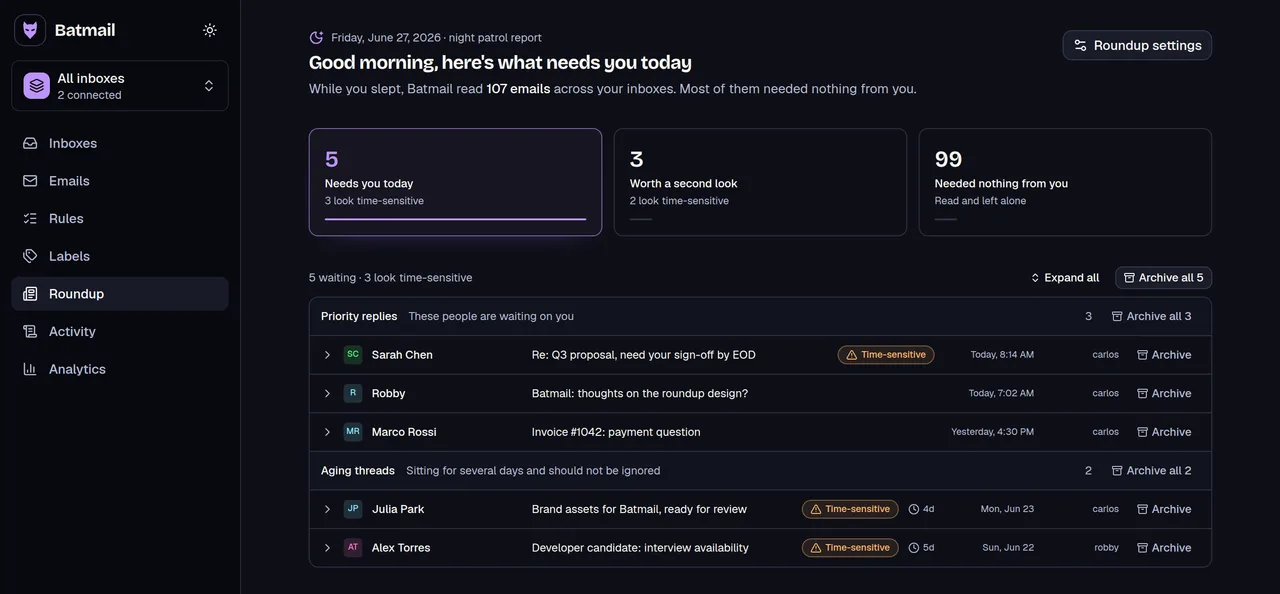
A signature goes on the mail you send. Batmail works on the mail that arrives: it reads what landed overnight, sorts it by what it needs from you, and hands you one short brief in the morning.
More free tools
There are more free tools here.
All free, all without an account.