Free tool, no signup
Free email schedule planner
Pick when an email should land in the reader's time zone. Get the exact time to schedule it in Outlook or Gmail.
When to schedule it
Reading your time zone.
This tool handles one email. Batmail handles the rest.
Continue with GoogleHow to use it
Here is how to land an email at the right hour anywhere.
The planner reads your time zone from this device and does the arithmetic, including the weeks when the clocks change.
- Pick the reader's time zone by the nearest big city.
- Pick the date and the time it should land on their clock, such as 9:00 AM on their Tuesday.
- Check your own time zone. It is read from this device, so change it only if you will schedule from somewhere else.
- Pick your mail app, and follow the steps with the date and time to type.
- Read the warnings: a weekend, a time in the middle of their night, or a date that is a different day for you.
One moment, two clocks
New York is 5 hours behind London that day.
These three emails show how the time moves between zones.
A London email lands at nine in New York.
Ottilie Fenwright in London wants a proposal in a New York buyer's inbox at the start of their Tuesday. She picks New York, Tuesday 20 October and 9:00 AM, and the planner says to schedule it for Tuesday 20 October, 2:00 PM, her time. New York is 5 hours behind London that day.
A Tokyo morning is the evening before in Los Angeles.
Kasimir Aldercott in Los Angeles writes to a supplier in Tokyo. For Tuesday 20 October, 9:00 AM in Tokyo, he schedules it for Monday 19 October, 5:00 PM, and the planner warns: "It is a different day for you."
A clock change moves the gap for a week.
Sunniva Brackenlow in New York schedules a note to land in London at 9:00 AM on Monday 26 October. Britain and the United States change their clocks on different weekends, so that day London is 4 hours ahead instead of 5 hours a week earlier. The planner schedules it for 5:00 AM her time and warns: "The clocks change before then."
When the clocks change
- Saturday 17 October
5 hours
London ahead of New York
- Monday 26 October
4 hours
London ahead of New York
To land at 9:00 AM in London that Monday, schedule it for 5:00 AM in New York.
These are the mistakes that make a scheduled email land at the wrong time.
The reader's time went into the box.
Mail apps schedule on your clock, and Google's help page says Gmail sends on the time zone you schedule in. Typing their 9:00 AM sends it at your 9:00 AM.
The date was left as today.
When the reader is many hours ahead or behind, their Tuesday morning can be your Monday evening. Check the date as well as the time.
Classic Outlook was closed.
Microsoft's help page says classic Outlook must be online and connected for a delayed email to go. Leave it running, or schedule from new Outlook or Outlook on the web.
The time fell in the middle of their night.
An email that arrives at 3:00 AM their time sits under everything that comes in before they wake. Aim for the start of their working day.
Two other free tools help with email across time zones.
- The meeting request email builder offers times that suit you both.
- The out of office generator covers the days you will not be there to reply.
Questions
These are the questions people ask.
The answers worth having before, and after, you use the tool.
How do I schedule an email in Outlook?
In new Outlook, Outlook on the web and Outlook.com, select the dropdown next to Send, then Schedule send, and choose a custom time. In classic Outlook, open Message Options, tick Do not deliver before under Delivery options and set the date and time. Both are on Microsoft's help page.
How do I schedule an email in Gmail?
Click the down arrow next to Send, choose Schedule send, and pick a date and time. In the app, tap More at the top right, then Schedule send. Google's help page says you can have up to 100 scheduled emails.
Which time zone does a scheduled email use?
Yours. Google's help page says Gmail sends scheduled email based on the time zone you schedule it in, which is why the planner turns the reader's time into yours first.
Does Outlook need to be open to send a scheduled email?
Classic Outlook for Windows does: Microsoft's help page says it must be online and connected, and the email waits in the Outbox. New Outlook and Outlook on the web keep it in Drafts until the time comes, and Microsoft's Mac page says Outlook for Mac sends it even when Outlook is closed.
How do I delay every email I send in Outlook?
In classic Outlook for Windows, a rule can hold every email in the Outbox for up to 120 minutes: File, Manage Rules & Alerts, New Rule, Apply rule on messages I send, then defer delivery by a number of minutes.
How do I cancel a scheduled email?
In Gmail, click Scheduled on the left, open the email and click Cancel send; it becomes a draft. In new Outlook or Outlook on the web, open it in Drafts and select Cancel send.
Is anything I type sent anywhere?
No. The times are worked out in your browser with its own time zone data, and nothing you type leaves this page.
This tool handles one email. Batmail handles the rest.
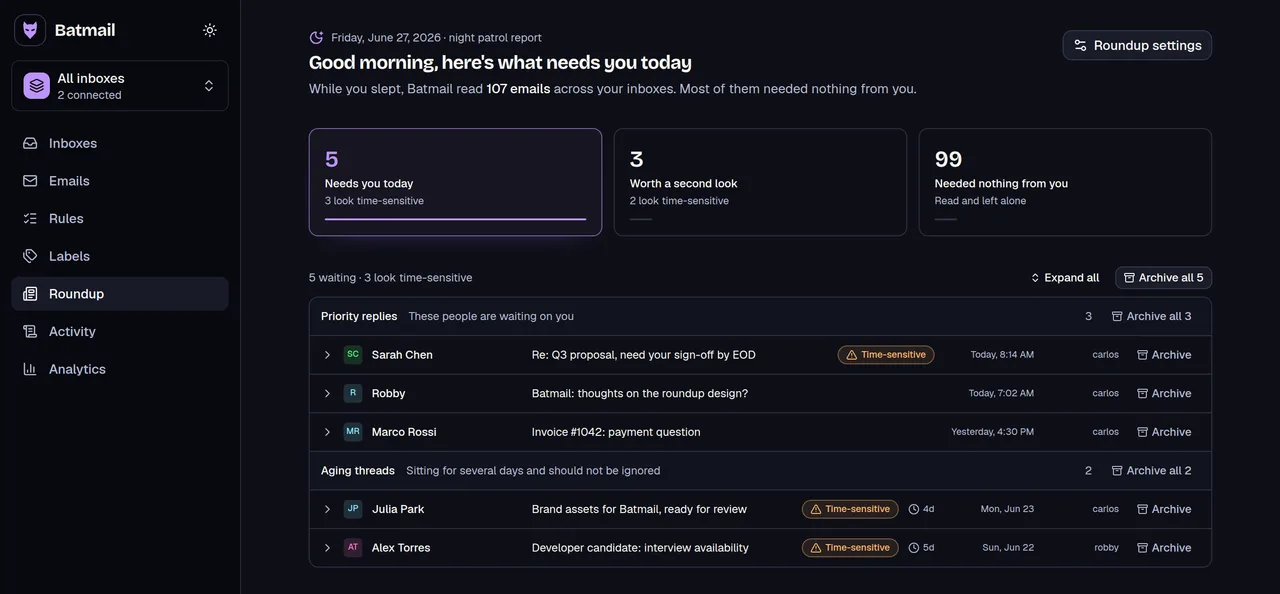
Scheduling decides when your email lands in someone else's inbox. Batmail looks after the mail landing in yours: it reads your Gmail overnight and hands you the threads that need you in one brief before your day starts.
More free tools
There are more free tools here.
All free, all without an account.