Notion Mail alternatives
Notion Mail shut down on 22 September 2026, and these are the best places to take your Gmail.
Notion announced the shutdown on 25 June. Your emails stayed in Gmail, but the things that lived only inside Notion Mail did not. Here is what happened, what was deleted, and what to use now.
The short answer
- Notion Mail shut down on 22 September 2026, after Notion announced it on 25 June.
- Your emails stayed in Gmail. Snippets and auto label instructions were deleted unless saved by 21 September, and custom views and reminders never carried over.
- Batmail is built for the same Gmail and Google Workspace inboxes, and it is free on one inbox.
What happened
This is how the Notion Mail shutdown unfolded, from the announcement to the last day.
Notion announces the shutdown, and the export of data that lived only in Notion Mail opens.
9to5MacNotion Help CenterThis is the last day to save drafts, scheduled emails, snippets and auto label instructions.
Notion Help Center
What was deleted
Your emails are safe in Gmail, and the Notion Mail extras are what was lost.
Notion Mail always synced two ways with Gmail, so everything you sent or received is still there.
These things stayed after the shutdown.
- Every email you sent or received, because it also lived in Gmail.
- Notion's agents and its Gmail connector, which Notion said keep working.
- Email databases already synced into Notion, which stay but stop updating.
These things were deleted unless you saved them.
- Drafts and scheduled emails that were not moved to Gmail.
- Snippets, and the files attached to them.
- Auto label instructions, which Notion's own help page told people to export.
- Custom views, sorting and email reminders, which could not be moved at all.
The list
These are the five best Notion Mail replacements for a Gmail inbox, with Batmail first.
Notion Mail only worked with Gmail and Google Workspace accounts, so each pick here runs on Gmail. Prices are each company's own, as they appear on its pricing page.
Batmail
Our pickBatmail sits on top of the Gmail you already use, works your inbox overnight and sends one short brief each morning. It runs rules you write as ordinary sentences, labels and files your mail with a written reason for each action, and works with the same Gmail and Google Workspace addresses Notion Mail did.
- Free plan
- Yes, 1 inbox
- Paid from
- $12 per inbox / mo
- Best for
- Rules in plain English and a morning brief on Gmail
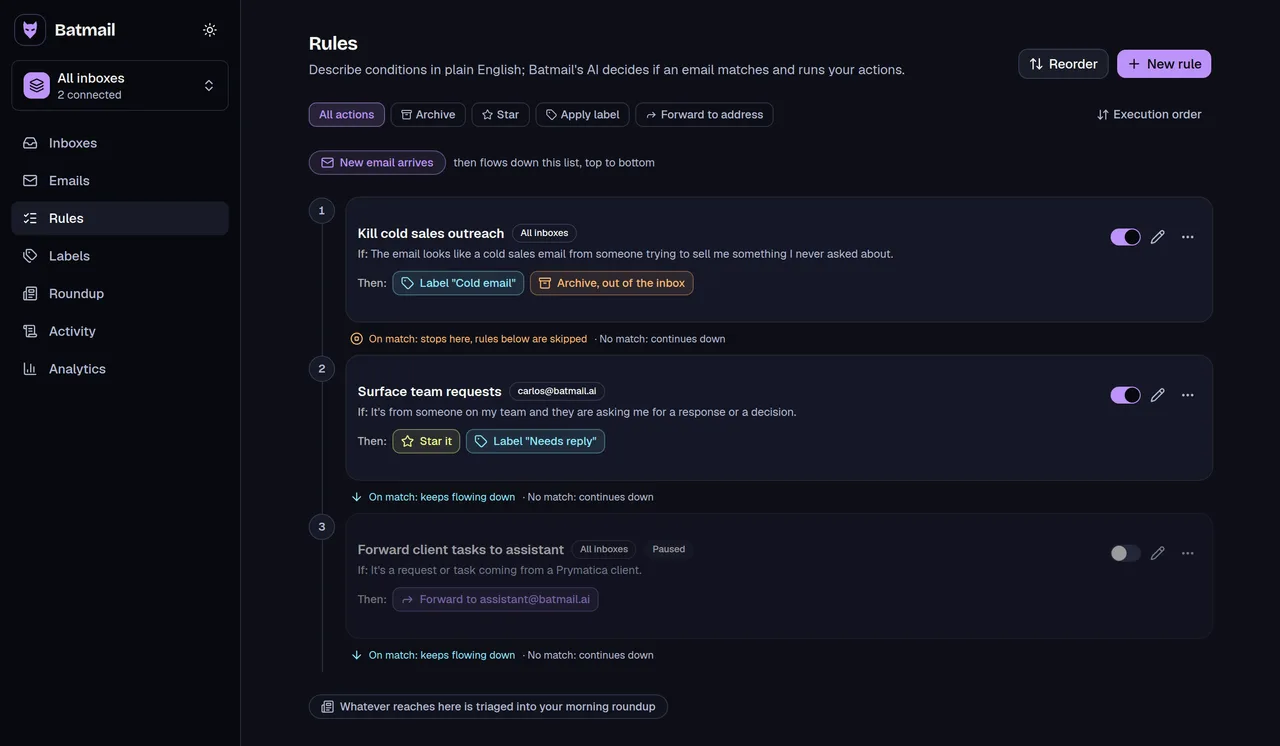
Batmail's rules, written as ordinary sentences and run in order every night. Screenshot of Batmail, on sample data. Superhuman
A fast email client for Gmail and Outlook with Auto Labels and snippets built in, which makes it the closest match to Notion Mail as an app. Starter is $25 a member a month billed yearly.
- Free plan
- No
- Paid from
- $30 per member / mo
- Best for
- A full email app with AI labels
Fyxer
Sorts Gmail and Outlook mail into its own categories, drafts replies and takes meeting notes, from $37 a month billed yearly.
- Free plan
- Yes, 400 credits a month
- Paid from
- $49 per person / mo
- Best for
- Reply drafts and meeting notes
SaneBox
Moves low-priority mail out of your inbox based on how you treat each sender, from $5.42 a month billed yearly.
- Free plan
- No, 7-day trial
- Paid from
- $9.49 / mo
- Best for
- Filtering on almost any email provider
Gmail's own tools
Gmail has filters, labels, templates and Schedule send built in, and together they cover most of what Notion Mail's snippets and scheduled emails did.
- Free plan
- Included in Gmail
- Paid from
- $0
- Best for
- Filters, labels, templates and scheduled sends



Moving over
You can move your Notion Mail setup to Gmail and Batmail in five steps.
Each row names what Notion Mail called a thing and where it goes now.
Auto label instructions
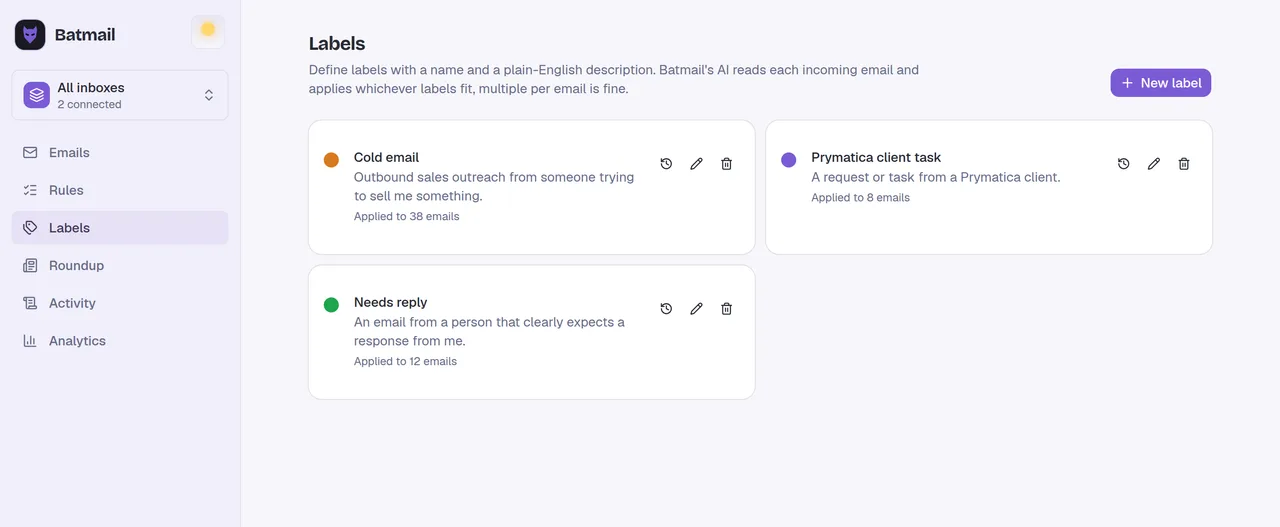
Write each saved instruction as one plain-English rule in Batmail, such as "Label invoices and receipts Finance and archive them." The rule runs every night and writes down why it acted.
Labels
Create the labels you still want in Gmail, then point a Batmail rule at each one so new mail lands in it.
Gmail Help: organize and archive emailSnippets
Recreate each snippet as a Gmail template, and download again any file that was attached to it, because attachments did not carry over.
Gmail Help: create a template in GmailDrafts and scheduled emails
Check Gmail for the drafts and scheduled emails you moved, and use Schedule send in Gmail for new ones.
Gmail Help: schedule emails to sendCustom views and reminders
These did not carry over to Gmail. Batmail's morning roundup lists what needs you in one place each day, so you read it instead of building a view.
Questions
These are the questions people ask after a shutdown like this.
Is Notion Mail still available?
No. Notion shut Notion Mail down on 22 September 2026, after announcing it on 25 June. The app for iOS, desktop and web went away for everyone, on every Notion plan.
Did I lose my emails when Notion Mail shut down?
No. Notion Mail always synced two ways with Gmail, so your email history is still in Gmail. What Notion deleted was data that lived only in Notion Mail, such as snippets, auto label instructions and custom views, unless you saved it before 21 September.
What is the best Notion Mail alternative for Gmail?
If you want rules you write in plain English and one morning brief on the Gmail you already use, Batmail: free on one inbox, then $12 per inbox a month. If you want a full email app to replace Notion Mail's, Superhuman is the closest, from $30 a member a month.
Does Batmail work with Google Workspace like Notion Mail did?
Yes. Batmail works with Gmail addresses and with every address on a Google Workspace domain. It does not connect other email providers.
Can I recreate my Notion Mail auto labels in Batmail?
Yes. Write each saved auto label instruction as a Batmail rule in plain English, and Batmail applies the label every night with a written reason on each email it touches. Notion's own help page suggested exporting the instructions before 21 September to use them elsewhere.
Try the night shift on one inbox for free.
Scout is free on one inbox, no card required, and your first morning roundup lands tomorrow.
More comparisons are one click away.
Everything on this page comes from these sources.
Read on . If something here is out of date, email support@batmail.ai and we will correct it.
- Notion Help Center: Notion Mail inbox is going away (saved 28 August 2026)
- Notion Help Center: Get started with Notion Mail (saved 12 May 2026)
- 9to5Mac: Notion is shutting down its AI-powered email client (25 June 2026)
- Engadget: Notion Mail is shutting down
- The Next Web: Notion Mail shuts down as Notion bets on AI agents
- Superhuman Mail plans
- Fyxer pricing page
- SaneBox pricing
- Gmail Help: create rules to filter your emails
- Gmail Help: organize and archive email
- Gmail Help: create a template in Gmail
- Gmail Help: schedule emails to send